Data Pipeline Observability: Logs, Lineage and Failure Context

A revenue report can be late even when its final transformation reports success. An upstream delivery may be incomplete, a retry may have read a different partition, or a dependent report may still show yesterday's materialized result. The on-call engineer needs to establish what happened to the relevant data before choosing a recovery action.
Data pipeline observability connects runtime signals, dataset checks, and dependency context to explain pipeline behavior and downstream impact. Monitoring detects defined conditions; observability supports investigation across signals. Engineers still need evidence of affected data, a failure explanation, and remediation authority.
The practical goal is an investigation another engineer can reproduce. A timeline, a dependency graph, and a convincing explanation are useful only when they refer to the same execution and data interval. That connection lets an operations team distinguish a local task problem from a broader data delivery issue.
Monitoring and observability answer different operational questions
Monitoring and observability work together. A freshness check can alert on a missed delivery; an investigation then examines why that delivery missed its deadline and which consumers actually received incomplete information. Monitoring tools may already provide much of this context. The distinction concerns how teams use evidence, rather than a rigid boundary between product categories.
ClairAI's distributed pipeline monitoring article describes the challenge of relationships across orchestration, data platforms, infrastructure, and business workflows. This guide focuses on the next operational step: joining those records into a defensible explanation. Collecting more signals without consistent identifiers can leave that step just as difficult.
| Operational question | Monitoring use | Investigation context |
|---|---|---|
| Has a condition changed? | Alert on duration or delivery checks | Match the signal to the relevant run and interval |
| What could be affected? | Show observed failures | Inspect dependencies and verify consumer reads |
| What action is justified? | Trigger the response procedure | Review mechanism, scope, authority and recovery checks |
Connect records through execution and data identity
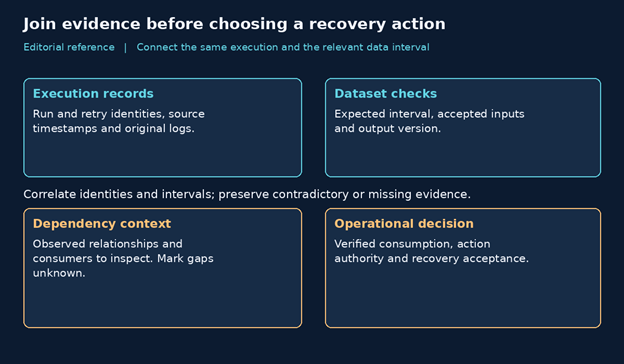
Start with the dataset or service commitment that failed. Record the expected data interval, affected environment, output identifier, and owner. Then locate the execution that produced that output. Keep an execution identifier separate from its retry attempt and from the business period being processed. Otherwise, records from different attempts can appear to describe one consistent event.
Apache Airflow's Dag Run documentation makes this distinction concrete: a run has a data interval, and its logical date represents that interval's start rather than the actual execution time. Preserve the scheduler's recorded interval and execution timestamps instead of reconstructing them from a dashboard label. A successful run status also requires interpretation alongside task behavior and data checks.
OpenTelemetry's signals documentation describes traces, metrics, and logs as different ways to observe activity. For a pipeline, a metric may reveal rising duration while a log records a rejected input. A trace can add execution context where instrumentation exists. None of these records automatically establishes which dataset version a business report consumed.
OpenLineage's object model distinguishes a job, an individual run, and input or output datasets. Its events can carry additional metadata through facets. These concepts provide a useful vocabulary for joining lineage with execution records. Actual coverage depends on the producers and metadata emitted; a standards-compatible label alone does not establish complete lineage for your environment.
Keep observation time separate from processing time
A late log arrival can distort the apparent order of events. Preserve both the timestamp recorded by the source and the time the collection system received it. Note clock uncertainty and missing intervals when they matter. Correlate the relevant execution identifiers before concluding that the first visible error caused every later symptom.
Use lineage to scope investigation and verify actual impact
Lineage identifies relationships that merit inspection. It can show that a transformation reads a particular table and produces an output used elsewhere. That relationship establishes a possible path of impact. To confirm affected consumption, check the actual input version, partition, query, cache refresh, or materialization associated with the consumer in question.
A declared dependency may differ from the path an execution took. Branching logic, manual exports, and uninstrumented applications can leave gaps. Keep planned relationships separate from observed runtime relationships, and date the evidence supporting each edge. Mark an unobserved consumer as unknown rather than presenting it as either unaffected or definitely broken.
Freshness also needs a business definition. A recent write timestamp does not prove that the output contains the required reporting period. Agree on the expected arrival, relevant partition, completeness checks, and consumer acceptance rule. A pipeline can write a fresh file that still omits one source or contains an old reporting window.
Build an investigation sequence that supports a decision
Before remediation, engineers need an affected scope, linked execution records, a plausible mechanism, evidence against competing explanations, and an approved recovery path. These requirements can be assembled progressively. Preserve unresolved questions in the incident record so the next owner can continue without treating a tentative diagnosis as an established fact.
| Step | Evidence to retain | Decision supported |
|---|---|---|
| 1 Establish scope | Dataset, interval, owner and commitment | Which delivery needs investigation? |
| 2 Join records | Run, attempts, timestamps and source logs | Do the records describe the same execution? |
| 3 Challenge the cause | Input checks, changes and competing explanations | Which mechanism fits the observations? |
| 4 Verify impact | Lineage plus actual consumer reads | What is confirmed, possible or unknown? |
| 5 Authorize recovery | Bounded action and acceptance checks | Who approves action and verifies restoration? |
The process should support containment while diagnosis continues. If a report is potentially incomplete, its owner may choose to pause distribution or label the data as under review. Record that business decision separately from a technical recovery attempt. Restoring a job does not, by itself, correct data that has already been delivered.
A hypothetical missing regional delivery
Consider a hypothetical retailer whose daily sales report lacks one region. The final aggregation completed, and the output table has a recent modification timestamp. The alert came from a completeness check comparing expected regional deliveries with accepted inputs. This is an illustrative investigation, not a ClairAI customer case or a measured result.
Establish the affected interval and input
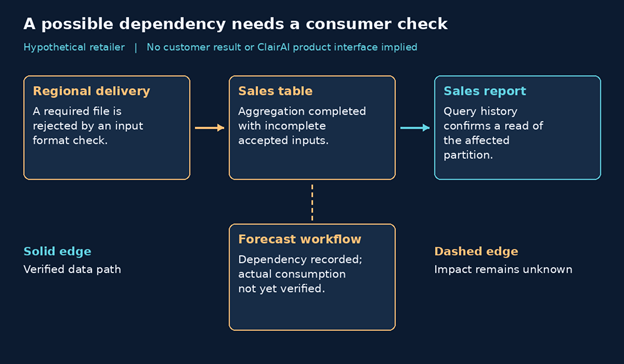
The engineer identifies the reporting date, aggregation run, and output partition. Input records show that the affected regional file was absent from the accepted batch. The source delivery log contains a format rejection associated with that file. Other regional deliveries were accepted. That evidence narrows the scope without assuming that every upstream system failed.
Test the explanation and inspect consumers
The investigation compares the rejected file with the expected contract and checks whether a valid replacement was later accepted. It also tests alternatives, including a wrong partition filter or a consumer cache that failed to refresh. The original rejection explains missing input only if the execution actually omitted that delivery and no subsequent correction reached the output.
Lineage shows the sales table feeding the report and a forecasting workflow. The report's query history confirms that it read the affected partition. Forecast consumption has not yet been verified, so its status remains unknown. The engineer sends the forecast owner the relevant dataset and interval instead of claiming a confirmed business impact.
Recover within the approved data boundary
The data owner approves correction of the rejected delivery and a bounded reprocessing plan. Before execution, the team checks how that plan handles duplicate records, downstream writes, and concurrent runs. Afterward, it validates regional completeness, reconciles the relevant totals, and confirms the report refreshed. Forecast impact requires its own consumer check before the incident closes.
Escalate when missing evidence changes the action
Escalate when the next step requires permissions you do not hold, data may be exposed or corrupted, a business deadline needs an owner decision, or the proposed recovery could alter an uncertain set of outputs. Missing telemetry is itself a reason to involve the responsible team when it prevents a reliable boundary around the action.
A useful handoff includes the symptom, affected interval, original record references, confirmed dependencies, unresolved consumers, and actions already attempted. State who owns the next decision and what would permit investigation to resume. This avoids transferring a pile of screenshots with an unsupported root-cause label attached.
Evaluate evidence quality and acknowledge coverage limits
Document coverage for the chosen pipeline before judging an investigation tool. Identify which components emit usable records, which relationships come from configuration, and which consumers require manual confirmation. Test a missing event and a renamed dataset deliberately. The response should show the uncertainty and preserve enough original context for an engineer to continue. A failed collection step should not silently turn into an apparently healthy pipeline. Include that collection path in operational ownership so gaps have a team responsible for repair.
Ask a platform provider to demonstrate one investigation using approved sample data. Can a reviewer navigate from an alert to its run, inspect original evidence, distinguish observed dependencies from assumptions, and identify unresolved impact? Ask how missing events, renamed datasets, and retries appear. Evaluate the explanation against records your team can independently inspect.
Access and retention affect that evaluation. Restrict access to sensitive logs and datasets, redact unnecessary values, and retain enough execution context for the required review window. Test whether an investigator can reconstruct the event with their assigned permissions. A graph that exists only for an administrator may not help the on-call team make its decision.
Use technical standards for specific evidence questions
OpenTelemetry supports runtime signal collection; OpenLineage supplies a model for jobs, runs, and dataset relationships; Airflow documents orchestration semantics. Together, these references explain why execution identity, data intervals, and observed dependencies belong in an investigation. They do not establish a causal finding, complete telemetry coverage, or a particular vendor's integration behavior.
Start with one pipeline your team can inspect
Measure the investigation process with explicit definitions. Record whether reviewers could retrieve the original evidence, verify the affected consumer and identify an authorized recovery owner. Separate time spent waiting for access from time spent testing a hypothesis. Review unresolved cases as well as completed incidents. These measures help reveal whether the main constraint is instrumentation, permissions, ownership or the explanation itself.
Choose a pipeline with a named consumer, an explicit delivery commitment, and a recovery owner. Test whether the team can connect a real alert to source records and verified consumption. Use the remaining gaps to prioritize instrumentation and operating changes. Pipeline reliability improves through those concrete decisions rather than through a larger collection of disconnected dashboards.
For a ClairAI evaluation, bring that pipeline, a sample incident, and the evidence your engineers need to review. Book a pipeline reliability assessment through the ClairAI contact form to discuss the scope. Confirm the available integrations, dependency detail, and assessment deliverables with the product team before relying on them in an operating procedure.
Frequently asked questions
How does data pipeline observability differ from pipeline monitoring?
Monitoring detects threshold conditions such as duration alerts or missed SLAs. Observability connects runtime signals, lineage, dataset checks, and execution context to explain why a failure happened, what was affected, and which bounded recovery action is justified.
Why can a pipeline report success when data is missing or corrupted?
A scheduler job can report success even when an upstream delivery is incomplete, a retry read a different partition, or silent schema drift omitted newly added attributes. Job completion measures scheduler execution, not data correctness, freshness, or completeness.
How does data lineage help during pipeline failure investigations?
Lineage scopes candidate dependencies and potential downstream impact. However, responders must still verify actual consumer query history, cache refreshes, and materializations to confirm whether downstream consumers read the affected partition.
Why should observation time be kept separate from processing time?
Late log arrival, batching delays, or clock drift can distort the apparent sequence of events. Retaining the source observation timestamp alongside the ingestion and processing timestamps ensures engineers reconstruct the true timeline of failure.
What evidence is required before authorizing a pipeline replay or recovery?
Before initiating reprocessing, engineers must establish the affected data boundary, verify source data readiness, confirm who approved the action, ensure consumers will not receive duplicate partitions, and define acceptance checks to confirm successful restoration.
See ClairAI in action
Turn enterprise data chaos into confident, real-time decisions.
Schedule a Demo →